A speech draft needs a review route before it becomes someone else's message
Separate dictation, editing and text-to-speech so the person can correct meaning before a message is exposed.
Speaking, dictating and having a device speak text are different activities. A person may want voice control to reduce keyboard work, text-to-speech to participate in a conversation, or a mixture that changes from task to task. The practical question is whether the person can inspect and correct the message before it reaches someone else. Convenience should preserve that authorship rather than make an accidental phrase harder to stop.
Microsoft's Voice access setup documentation describes controlling a supported Windows computer and authoring text through on-device speech recognition. Initial setup requires the relevant language files to be downloaded; subsequent use has a different connectivity boundary. These are documented product functions, with supported-system and language conditions, not a medical intervention or a performance test conducted for this article. [Voice access setup](https://support.microsoft.com/en-us/accessibility/windows/voice-access/set-up-voice-access).
Apple's Live Speech documentation describes typing words that a device can speak during supported calls, apps or in-person conversations, including saved phrases. That is text-to-speech, distinct from recognising what a person has said. The documentation lists compatible devices and software. It does not establish that a particular person finds either interaction comfortable or that all communication apps behave identically. [Live Speech](https://support.apple.com/en-us/105018).
Follow the person's chosen mode
Begin with the task and the person's preferences. Someone might dictate a rough note, edit it with a keyboard and use a conventional system voice to speak the accepted text. Another person may prefer typing throughout. Neither pattern needs to be framed as a failure to use an AI feature. A useful workflow offers a clear path to the intended message and lets the person change mode without losing the draft.
Separate words being entered from commands that control the application. The user should know which field has focus, whether the microphone is listening and which action will expose the message to others. These checks become especially important around controls for submitting, deleting or moving between contexts. A proposed workflow should be tried with synthetic text before it is trusted with a consequential communication.
W3C's explanation of WCAG success criterion 2.1.4 addresses accidental activation of character-only shortcuts, including through speech input. It explains options to turn them off, remap them or make them active only when their component has focus. This is a specific accessibility concern and informative explanation; citing it does not certify an application or show that every speech-related interaction meets all accessibility requirements. [Character-key shortcut guidance](https://www.w3.org/WAI/WCAG22/Understanding/character-key-shortcuts.html).
Correct the meaning, not only the spelling
An apparently small transcription change can alter a message's meaning. Review names, negations, dates, quoted words and the requested action against the speaker's intention. A fluent rewrite can introduce a different error by making a tentative phrase sound like a commitment. Ask an assistant to identify uncertainty or offer alternatives, while keeping the original draft available for comparison.
A 2020 PNAS study found substantial differences in transcription error rates across speaker groups in its historical US interview data and the commercial recognition systems examined. That evidence motivates representative evaluation; it is not a measurement of today's Voice access, Live Speech, any individual's voice or a clinical outcome. Current tools and contexts require their own assessment rather than inheriting a past study's rates. [Primary speech-recognition study](https://pmc.ncbi.nlm.nih.gov/articles/PMC7149386/).
For an individual's proposed trial, record the kinds of corrections that matter to their task. Distinguish a harmless punctuation choice from a changed name or instruction. Include ordinary variation in speaking conditions rather than repeatedly rehearsing only an easy phrase. This is a suggested evaluation approach, not a claim that this publication recorded anyone or measured a reduction in errors.
A fictional community-workshop announcement
Imagine a fictional Toronto volunteer preparing a short announcement about a community workshop. The message and people are invented, and this example has not been performed. The intended draft says that registration has not closed. A deliberately faulty synthetic transcript loses the negation. The exercise asks whether the person can notice and correct that change before anything is spoken or sent.
Keep the intended wording, the draft transcript and the accepted version visibly separate. The volunteer can compare them directly or ask another person to read the draft back, according to their preferred method. The worked conclusion is that the missing negation reverses the message. A polished sentence should not be accepted merely because its grammar is good and its pronunciation sounds natural.
Next, add an optional rewrite that changes a request for confirmation into a statement of certainty. The reviewer should retain the uncertainty in the final draft. The exercise demonstrates a meaning check, not an accuracy score for a named model. It also avoids presenting a volunteer's decision as evidence that a device has been validated for all speakers or all environments.
Finally, practise an interruption with the synthetic draft still unsubmitted. The desired outcome is a preserved, clearly unfinished message and a known way to resume review. If the person cannot tell whether speech has already been played to others, the next step is to establish the actual outcome. Repeating the action without that information can expose the same message again.
Privacy and ownership remain visible
Choose the material needed for the task and the people who may hear it. An on-device recognition function does not make a surrounding call, cloud document, shared room or connected application private. Establish those boundaries separately. This article proposes no recording of bystanders, voice imitation or transfer of private speech; the example uses fictional text and an ordinary system voice.
Provide a written version when that helps participants follow the conversation, and let the author inspect corrections in the form they prefer. A spoken rendering is one presentation of the message. It should not become the only record of what was accepted, especially if listeners later need to check an unfamiliar name or the precise wording of a request.
On a shared device, record choices without turning them into fixed assumptions about a person. A visitor may want quiet typed text today and audible output later. Returning to an old session should not unexpectedly expose a saved phrase. The proposed handover is the accepted wording and chosen output for this occasion, with a visible chance to change it. It is not a permanent profile inferred from someone's voice or appearance.
The meaningful measure of a personal trial is whether the person can complete the chosen communication with understandable feedback and a workable correction path. Count the effort of review and recovery alongside entry. Do not turn a feature demonstration into a claim about restored ability, medical benefit or universal time savings. The author should remain able to say what the message means and when it may leave the draft.
Conceptual diagram and reading guide
The following original diagram explains the article's fictional exercise. It has not been run and adds no observed product result.
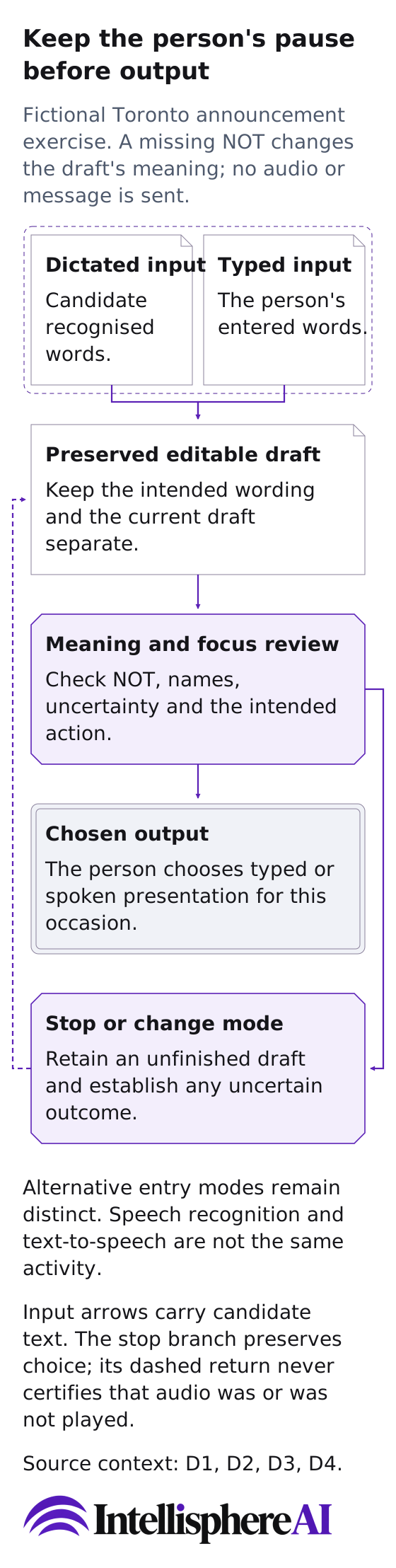
Original conceptual diagram of the fictional, unrun announcement meaning-review exercise; no product action, measurement or approval is depicted.
[Open the complete diagram](/assets/personal-evidence-message-pause-20261016.svg)
Keep the person's pause before output
Fictional Toronto announcement exercise. A missing NOT changes the draft's meaning; no audio or message is sent.
Dictated input
Candidate recognised words.
Typed input
The person's entered words.
Preserved editable draft
Keep the intended wording and the current draft separate.
Meaning and focus review
Check NOT, names, uncertainty and the intended action.
Chosen output
The person chooses typed or spoken presentation for this occasion.
Stop or change mode
Retain an unfinished draft and establish any uncertain outcome.
Alternative entry modes remain distinct. Speech recognition and text-to-speech are not the same activity.
Dictated input to Preserved editable draft: Recognition supplies candidate words, not automatic exposure or authorship transfer.
Typed input to Preserved editable draft: Typing is another valid entry route; it is not a failure to use speech.
Preserved editable draft to Meaning and focus review: Review the message's meaning, including negation and tentative wording.
Meaning and focus review to Chosen output: Only the person's chosen presentation follows the review; this drawing performs neither route.
Meaning and focus review to Stop or change mode: An interruption or changed preference may stop the proposed output.
Stop or change mode to Preserved editable draft: Keep the draft available and inspect an unclear outcome before repeating an exposure action.
Input arrows carry candidate text. The stop branch preserves choice; its dashed return never certifies that audio was or was not played.
No recording, clinical result, individual accuracy or full accessibility conformance implied.
The intended registration has not closed statement loses NOT in a constructed draft. Fluent wording or natural pronunciation does not resolve that reversal.
Source context
These references ground the documented distinctions; the pictured routine is original editorial guidance, not a service observation.
- [D1: Set up voice access](https://support.microsoft.com/en-us/accessibility/windows/voice-access/set-up-voice-access) - [D2: Use Live Speech on your iPhone, iPad, Mac, or Apple Watch](https://support.apple.com/en-us/105018) - [D3: Understanding SC2.1.4: Character Key Shortcuts](https://www.w3.org/WAI/WCAG22/Understanding/character-key-shortcuts.html) - [D4: Racial disparities in automated speech recognition](https://pmc.ncbi.nlm.nih.gov/articles/PMC7149386/)