AionUi should earn your workspace access one workflow at a time
Verify the canonical desktop release, select its built-in or external-agent path and earn workspace trust through a small inspectable artifact.
A desktop agent is valuable when it turns a bounded request into a file you can inspect and reuse. The same access can become confusing when the application offers built-in models, external coding agents, previews and optional remote access in one interface. Before giving AionUi an important directory, establish which component will act, which provider receives the material and how you will check its output.
The canonical project reviewed here is `iOfficeAI/AionUi`, not a similarly named fork or a download site's repackaging. Its repository identifies an Apache 2.0 license, and its release redirect resolved to v2.2.2 when checked on 16 October 2026. Those are public source/release observations. No installer was downloaded or executed, and this article does not claim acceptance of a particular installed build.
Verify identity and version before features
Open the [canonical repository](https://github.com/iOfficeAI/AionUi), follow its release link and select the artifact for the intended operating system and architecture. Distinguish a ready installer from a source archive. Record the release tag and the version reported by the application after an independently approved installation.
Read the [actual license](https://github.com/iOfficeAI/AionUi/blob/main/LICENSE) rather than treating the word “open” as a complete commercial statement. Apache 2.0 covers the inspected project code; providers, model weights, extensions and redistributed dependencies can carry additional terms. An open-source desktop client does not make hosted inference free or grant permission to send an employer's repository to any endpoint.
Choose between two execution paths
AionUi documents a built-in agent engine and an optional external-agent path. The latter detects supported command-line tools and connects through ACP or compatibility adapters. The important boundary is that an external agent retains its own model, authentication, tools and behavior. Changing a built-in model setting is not automatically a change to an already configured Codex, Kimi or Claude Code process. [ACP Setup](https://github.com/iOfficeAI/AionUi/wiki/ACP-Setup) explains this architecture.
Write down the selected path before configuring credentials. For example: “AionUi built-in agent using the approved custom endpoint,” or “AionUi launching the independently configured Kimi CLI.” This is not administrative ceremony. It identifies which process to inspect when the selected model seems wrong, a credential is unavailable, or a permission dialog differs from expectations.
Configure a built-in provider carefully
The current [LLM Configuration wiki](https://github.com/iOfficeAI/AionUi/wiki/LLM-Configuration) describes Settings, Model Settings and Add Model. For a listed provider, use its corresponding preset and approved credential. For a Custom platform, the wiki describes a base URL, API key and model names for an OpenAI-compatible service. A local endpoint without authentication is a distinct case, not a reason to use a meaningless placeholder against a commercial service.
These are documentation-backed steps, not universal feature guarantees for every historical release. A reported older-version issue and the current wiki differ about custom-model availability. If the installed build does not present the documented control, stop and check its release notes and supported path. Do not edit undocumented databases or infer that a hidden field can safely enable a capability.
Before the first task, verify the endpoint's protocol and the exact model identifier with its operator. A model-name string is not evidence of tool support, vision or the ability to execute a file workflow. Test the capabilities the task actually needs instead of assuming the preset's label establishes them.
Use a deliberately small workspace
Create an owned folder containing a fictional project brief, two text notes and an empty output directory. Use invented names and requirements. Ask the built-in agent to summarize the notes into a Markdown project checklist, without modifying the inputs or accessing anything outside that folder.
Inspect the requested tool actions and compare the result with the notes. Does it preserve the required dates? Does it distinguish a stated requirement from its own suggestion? Can you open the resulting file in an ordinary editor? This exercise is illustrative; it describes what to test, not a result observed on AionUi here.
Then authorize a single revision to the output checklist. Require the assistant to keep the original source notes unchanged. Review the actual file diff, not just the final chat message. A polished preview may make an incorrect output appear authoritative, so validation must follow the source material rather than the presentation.
Test an external agent as a separate route
If the intended workflow depends on an existing coding client, first make that client work independently in a terminal. Record its executable version, authentication route and owned repository. Then reopen AionUi so its documented detection can see the installed command on PATH. Select the external-agent path explicitly and repeat a small reading task before permitting an edit.
The ACP wiki lists commands including `claude`, `codex`, `qwen`, `gemini`, `kimi` and `vibe-acp`, with agent-specific behavior. That list is not proof that all adapters offer identical permissions or model selectors. Keep the external client's configuration and credentials in its documented custody, and avoid copying one client's secrets into another client's settings simply to make a dialog disappear.
Treat remote access as a later decision
The project documents WebUI and remote-access capabilities, but a local desktop pilot does not need to expose them. Leave them outside the first exercise unless there is an explicit operational reason and a separately reviewed access plan. Remote control changes who can reach a tool that may read and write files; it deserves its own authentication, network and recovery review.
Likewise, defer scheduled automation and unattended modes. A successful one-off checklist task does not demonstrate that a process should run forever, that prompts will remain appropriate, or that all future tool actions are authorized. Test a repeatable manual workflow first and make its stopping conditions explicit.
Leave evidence a colleague can understand
Record the application version, canonical download source, selected execution path, model endpoint owner and allowed workspace. Note what files were actually produced, how they were validated and which features remain untested. Do not retain API keys, private note contents or credential-bearing logs in a public issue.
When a task fails after a file operation, inspect the folder before retrying. Preserve completed work and separate an uncertain final response from a confirmed absent output. The useful standard for a desktop client is not that it accepts a key or renders a convincing conversation. It is that a bounded workflow produces a correct, reviewable artifact through an explainable provider and permission path. The [getting-started guide](https://github.com/iOfficeAI/AionUi/wiki/Getting-Started) helps locate the product controls; that operational evidence must still be established on the actual installation.
Explanatory diagram and accessible reading guide
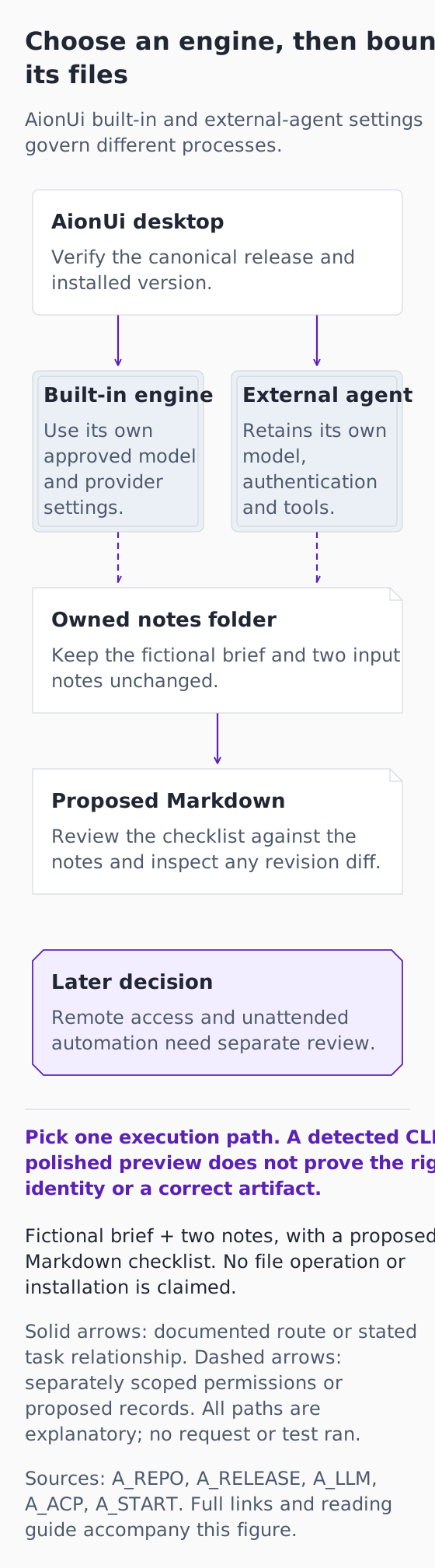
*Original explanatory infographic for “AionUi should earn your workspace access one workflow at a time”. Documentation checked 16 October 2026. Fictional exercise; no connected account, completed request or observed result.*
[Open the full-size explanatory diagram](/assets/practical-ai-aionui-workspace-20261016.svg)
This original diagram explains documented boundaries and a fictional exercise that has not been run. It is not an authentic product screenshot, a connected account or a successful request.
Choose an engine, then bound its files
AionUi built-in and external-agent settings govern different processes.
AionUi desktop
Verify the canonical release and installed version.
Built-in engine
Use its own approved model and provider settings.
External agent
Retains its own model, authentication and tools.
Owned notes folder
Keep the fictional brief and two input notes unchanged.
Proposed Markdown
Review the checklist against the notes and inspect any revision diff.
Later decision
Remote access and unattended automation need separate review.
Pick one execution path. A detected CLI or polished preview does not prove the right identity or a correct artifact.
Fictional brief + two notes, with a proposed Markdown checklist. No file operation or installation is claimed.
Solid arrows: documented route or stated task relationship. Dashed arrows: separately scoped permissions or proposed records. All paths are explanatory; no request or test ran.
Sources: A_REPO, A_RELEASE, A_LLM, A_ACP, A_START. Full links and reading guide accompany this figure.
AionUi desktop → Built-in engine: Choose the built-in engine path and its own provider settings.
AionUi desktop → External agent: Alternatively choose an independently configured external agent.
Built-in engine → Owned notes folder: The chosen built-in path is limited to the approved workspace.
External agent → Owned notes folder: Alternatively the chosen external agent is limited to its approved workspace.
Owned notes folder → Proposed Markdown: Propose a new output from the fictional inputs; preserve the original notes.
The fork shows alternative engine selection, not two simultaneously authorized agents. Dashed links are proposed workspace scope; the output arrow is a fictional task relationship, not proof of a saved file. The unconnected later-decision box is deliberately outside the first task. Current wiki guidance and the old v2.1.13 user report are distinct; no hidden database change or restriction workaround is proposed.
The manuscript proposes an owned folder with a fictional brief, two notes and an empty output directory. Authorize only the checklist output, compare dates and requirements against the inputs, then permit one bounded output revision while preserving every source note. Inspect the folder before retrying an uncertain file operation.
Diagram source references
- [A_REPO: AionUi canonical repository](https://github.com/iOfficeAI/AionUi) — iOfficeAI repository namespace.
- [A_RELEASE: AionUi release v2.2.2](https://github.com/iOfficeAI/AionUi/releases/tag/v2.2.2) — iOfficeAI/AionUi repository.
- [A_LLM: AionUi LLM Configuration wiki](https://github.com/iOfficeAI/AionUi/wiki/LLM-Configuration) — iOfficeAI/AionUi project wiki.
- [A_ACP: AionUi ACP Setup wiki](https://github.com/iOfficeAI/AionUi/wiki/ACP-Setup) — iOfficeAI/AionUi project wiki.
- [A_START: AionUi Getting Started wiki](https://github.com/iOfficeAI/AionUi/wiki/Getting-Started) — iOfficeAI/AionUi project wiki.