Check the workbook before AI turns it into a polished report
Identify the question, source version and units before trusting an assistant's formula or copying its static result.
A short report can conceal a spreadsheet mistake more effectively than a messy table. Once an assistant turns rows into a confident paragraph, the reader may stop asking which records were included, what an empty cell meant or whether the chart still follows the underlying data. Personal productivity improves only if the resulting document can survive those questions without requiring its author to reconstruct the entire workbook.
Microsoft's current direct-answer experience in Copilot for Excel describes Python-based analysis over tables or table-like ranges and says unstructured data is unsupported. That particular experience does not modify the workbook; a returned static table or visualisation is not refreshable. The distinction matters when someone copies an answer into a document and later changes the source sheet. It is a documented behaviour, not a feature this publication executed. [Direct-answer documentation](https://support.microsoft.com/en-us/excel/get-direct-answers-to-your-data-analysis-questions).
Other Copilot features can generate formulas, create calculated rows or columns and explain existing formulas. Microsoft's guidance explicitly asks users to review and verify generated content. A statement about the read-only analysis experience should therefore not be stretched into a claim that every Copilot operation leaves a workbook unchanged. Identify the mode and permitted effect before accepting a suggestion. [Formula and insight features](https://support.microsoft.com/en-us/excel/copilot/data-insights-with-copilot-in-excel).
A realistic workbook is more than a formula
The original SpreadsheetBench paper, first submitted in June 2024, studies spreadsheet manipulation using questions drawn from actual user scenarios. Its abstract describes irregular layouts and evaluation across different spreadsheet instances. This is research about defined tasks and tested systems; its findings do not supply a current accuracy score for a reader's personal workbook or every consumer assistant. [SpreadsheetBench](https://arxiv.org/abs/2406.14991).
The June 2026 SpreadsheetBench 2 preprint expands the unit of evaluation to workflows involving generation, debugging and visualisation. Its authors identify insufficient inspection and incorrect target-cell selection among important failure patterns in their evaluation. A request can consequently be misunderstood before any arithmetic is attempted. The benchmark is useful context, while the article's proposed checking procedure remains untested. [Workflow-level benchmark](https://arxiv.org/abs/2606.29955).
Start by writing the sentence the final document needs to support. Then identify the table, period, units and inclusion rule needed to answer it. A request to summarise the workbook leaves those choices open. A more useful preparation task asks the assistant to locate the relevant sheets and explain which records it would use, with uncertain fields listed before a result is generated.
Keep the source workbook intact and work on a clearly identified copy when edits are permitted. Record which changes were proposed, which were accepted and which remained questions. A filename such as final does not explain whether someone approved the formulas or merely liked the formatting. The review record should make that difference understandable to another person.
Check purpose as well as calculation
The UK government's AQuA Book distinguishes verification of an analysis against its specification from validation of its fitness for the intended purpose. It also gives documentation and assurance distinct responsibilities. This is an analytical-quality framework, not certification of a particular spreadsheet or a requirement imposed on a private household. Its distinction is useful when the calculation is correct but answers the wrong question. [AQuA guidance](https://www.gov.uk/government/publications/the-aqua-book-guidance-on-producing-quality-analysis-for-government).
For a small personal task, a review note can remain short. State the source version, included records, unit definitions, formula location and unresolved exceptions. Recalculate a deliberately small sample through an independent method. If the question concerns missing records, inspect the omissions directly: agreeing totals among the rows already selected cannot prove that the selection was complete.
Read generated formulas before accepting their explanation. Check the actual references and the intended behaviour of blanks, duplicates, dates and text values. An explanation can describe an attractive calculation while the inserted formula points somewhere else. The appropriate deliverable is the reviewed formula and its defined scope, accompanied by enough information to repeat the check.
An invented equipment-return report
Imagine a fictional Nairobi community workshop whose volunteer keeps an equipment-loan workbook. A draft report is meant to tell the next organiser which items still need follow-up. The records and example are synthetic, and no spreadsheet operation has been run here. One row has an empty return field; another uses a pair as its unit while the rest use individual items.
The first proposed assistant task is to describe the table and identify uncertain meanings. It should ask whether the empty return field means not returned, not recorded or not applicable. It should also flag the inconsistent unit. The worked conclusion is that a clean total cannot settle either question. The organiser must supply the definitions before accepting a claim about outstanding equipment.
Next, the fictional organiser clarifies the blank and records an explicit unit conversion. A reviewer checks a sample from the original rows through the calculated result. Only then should a draft paragraph be prepared. It should preserve any unresolved item instead of replacing uncertainty with a broad statement that all equipment has been returned. Nobody's real conduct or liability is being assessed.
Now alter the synthetic workbook after the paragraph has been copied. The earlier document remains a description of the previous version unless it is deliberately refreshed and reviewed. The exercise's final handover should identify that dependency. It should not quietly present a static copied chart as a live window onto today's records, or claim that an unperformed exercise measured reliability.
Carry the evidence into the document
Attach a concise source note to the report: which workbook version, which sheet or table, what period and what rule produced the finding. Preserve the calculation separately from the narrative interpretation. This makes a correction manageable. If the source data change, the author can identify which sentences require review instead of asking a model to rewrite the entire report without an account of the difference.
A failure should leave the working copy and review notes usable. If an assistant cannot inspect a protected sheet, recognise the limitation rather than supplying it with unrelated private material or asking it to guess the structure. If a proposed edit's outcome is uncertain, inspect the copy before repeating the instruction. A second attempt can obscure which version contains the accepted change.
Product access, supported files and feature behaviour need checking in the current official documentation. No subscription, integration or price is verified by this article, and no real workbook was uploaded. For a personal trial, assess the corrections needed before the report can be accepted and the ease of tracing it back to records. A quicker paragraph is useful when it carries a defensible answer forward.
Conceptual diagram and reading guide
The following original diagram explains the article's fictional exercise. It has not been run and adds no observed product result.
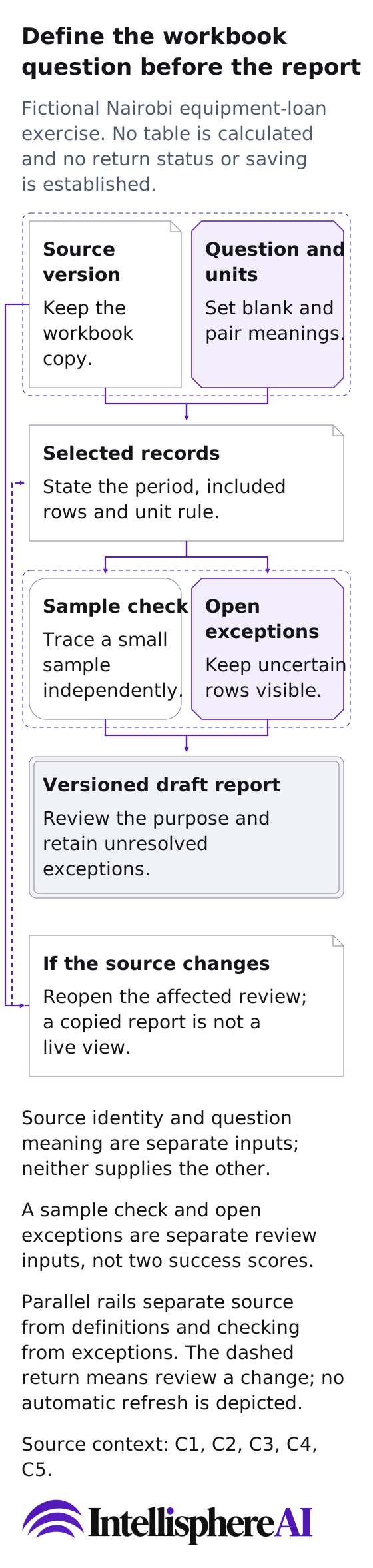
Original conceptual diagram of the fictional, unrun equipment-loan definition exercise; no product action, measurement or approval is depicted.
[Open the complete diagram](/assets/personal-evidence-workbook-definition-20261016.svg)
Define the workbook question before the report
Fictional Nairobi equipment-loan exercise. No table is calculated and no return status or saving is established.
Source version
Keep the workbook copy.
Question and units
Set blank and pair meanings.
Selected records
State the period, included rows and unit rule.
Sample check
Trace a small sample independently.
Open exceptions
Keep uncertain rows visible.
Versioned draft report
Review the purpose and retain unresolved exceptions.
If the source changes
Reopen the affected review; a copied report is not a live view.
Source identity and question meaning are separate inputs; neither supplies the other.
A sample check and open exceptions are separate review inputs, not two success scores.
Source version to Selected records: The chosen workbook version identifies the source records.
Question and units to Selected records: The organiser must settle what a blank means and whether a unit is a pair or an item.
Selected records to Sample check: An independent sample follows the actual included rows through the proposed calculation.
Selected records to Open exceptions: Unresolved records remain visible rather than being silently dropped.
Sample check to Versioned draft report: A calculation check supports review; it does not alone establish fitness for purpose.
Open exceptions to Versioned draft report: The draft carries remaining exceptions instead of claiming every item was returned.
Source version to If the source changes: A later source version is a new dependency event, not an automatic report update.
If the source changes to Selected records: Changed records require a refreshed, reviewed selection before reusing the report.
Parallel rails separate source from definitions and checking from exceptions. The dashed return means review a change; no automatic refresh is depicted.
No actual workbook or static-output refresh tested; methods and product modes remain separate.
An empty return field may mean not returned, not recorded or not applicable. A pair cannot silently be counted as an individual item.
Source context
These references ground the documented distinctions; the pictured routine is original editorial guidance, not a service observation.
- [C1: Get direct answers to your data analysis questions](https://support.microsoft.com/en-us/excel/get-direct-answers-to-your-data-analysis-questions) - [C2: Get data insights with Copilot in Excel](https://support.microsoft.com/en-us/excel/copilot/data-insights-with-copilot-in-excel) - [C3: SpreadsheetBench: Towards Challenging Real World Spreadsheet Manipulation](https://arxiv.org/abs/2406.14991) - [C4: SpreadsheetBench 2: Evaluating Agents on End-to-End Business Spreadsheet Workflows](https://arxiv.org/abs/2606.29955) - [C5: The AQuA Book](https://www.gov.uk/government/publications/the-aqua-book-guidance-on-producing-quality-analysis-for-government)