Choose Gemini CLI's identity path before giving it a repository
Choose Google account, Gemini API key or Vertex identity deliberately, then verify a bounded repository workflow.
The first consequential choice in a coding-agent setup is often made before the first prompt. Which identity will the client use, which project or account will own the activity, and what repository material is it permitted to send? Gemini CLI makes those questions visible through distinct Google-account, Gemini API-key and Vertex AI authentication routes. Treating them as interchangeable creates avoidable confusion about access, policy and troubleshooting.
This article proposes a careful first-use workflow for a developer or small team. The sample repository and acceptance exercise are illustrative, not a reported customer deployment. No Google account, API key, cloud project or coding client was connected during this research.
Anchor the client, not an assumed model
Google's installation documentation lists a Node.js runtime requirement and supported operating systems, and distinguishes stable, preview and nightly channels. The page checked here requires Node.js 20 or later; it should be consulted again before installation because platform support can change. The official repository release link resolved to Gemini CLI v0.64.0 when checked on 16 October 2026. That is a documentation/release anchor, not proof of the version on a reader's computer. [Installation and releases](https://geminicli.com/docs/get-started/installation/) and the [tagged release](https://github.com/google-gemini/gemini-cli/releases/tag/v0.64.0) establish the reference.
Record the actual result of `gemini --version` after an approved installation. Do not use a model's marketing name as the CLI version, or treat a nightly example copied from a webpage as the stable deployment recommendation. A release channel is a deliberate maintenance decision, particularly when a team depends on repeatable tool approval and session recovery behavior.
Pick one authentication route deliberately
Google documents three principal routes: signing in with a Google account, using a Gemini API key, and using Vertex AI credentials. A company or school account may need project and administrator configuration that an individual account does not. A key from Google AI Studio is not the same identity as a service account or the person authenticated through Application Default Credentials.
Before choosing, write a short ownership statement: “This experiment uses this identity, under this account or cloud project, for this approved repository copy.” Ask the organization to confirm its allowed locations and access policy. Do not infer a location from the developer's IP address or from the language of a console. The [authentication guide](https://geminicli.com/docs/get-started/authentication/) provides the actual route-specific prerequisites.
A practical first setup
1. Choose a small repository that you own or are allowed to test. Remove customer exports, deployment secrets and unrelated directories from the working copy. 2. Select the approved installation method and release channel. Google's npm route is `npm install -g @google/gemini-cli`; that command is shown for readers, not executed here. 3. Open a fresh shell in the repository and verify the installed version. Start `gemini` and select the authentication method that matches the ownership statement. 4. For an API-key route, supply `GEMINI_API_KEY` privately using the documented mechanism and choose the API-key option. Do not paste the value into a prompt or commit it with the project. 5. For Vertex AI, follow its project, location, enabled-service and IAM prerequisites rather than substituting an AI Studio key. If using ADC, follow Google's instructions about conflicting key variables before the application-default login flow. 6. Confirm the active identity and selected model within the client, then begin with a nonsensitive question. Record the route and outcome without capturing the credential.
The purpose of choosing one route is diagnostic clarity. If the wrong account is active, changing the model prompt will not fix the authorization problem. If the project lacks a required service or role, adding more keys can simply obscure which identity is failing.
Make the first repository task a reading task
Imagine a fictional TypeScript utility that validates event dates. It contains a parser, a formatter and a few tests. Ask the agent: “Identify where invalid dates are rejected. Explain the existing tests; do not edit files or run commands yet.” Check the files and lines it identifies.
Next, permit a change to one test file: add a case for an invalid leap-day input. Ask for a plan before a patch, inspect the diff, and approve the repository's narrow test command only after reviewing what it does. This staged exercise distinguishes repository understanding from permission to execute code. An accurate explanation is useful, but it does not establish that shell access or a file write worked.
Keep expected outcomes explicit. The client should not modify the parser when only the test was authorized, install a new dependency to avoid understanding the existing stack, or report a test result that was never observed. These are proposed acceptance criteria for your workflow, not a claim that a particular Gemini release will always satisfy them.
Do not invent an arbitrary provider bridge
Gemini CLI's official authentication routes concern Google's supported services. This guide does not establish that changing an OpenAI-style base URL makes the Google client compatible with any other vendor. Similarly, another project's ability to call the Gemini API does not give that project all Gemini CLI tools or authentication features.
If an organization wants a proxy, require documentation for that exact client, authentication flow and transport. Identify who translates requests and which features are supported before making the proxy a production dependency. Model capability, client protocol and local tool permission are separate layers. A successful text answer exercises only a small part of them.
Privacy follows the chosen service path
The authentication choice affects the applicable terms, quotas and privacy notices. Google's [CLI terms and privacy page](https://geminicli.com/docs/resources/tos-privacy/) should be read alongside the specific identity route, not replaced with a universal statement that all Google AI activity has the same data treatment.
For a practical pilot, map what can leave the machine: prompts, retrieved source fragments, tool results and any explicitly attached files. The repository may contain secrets outside the files named in the first prompt. Limit the workspace and inspect requested commands; do not assume that a cloud-model connection becomes local processing because the terminal interface runs locally. Never treat open-source client licensing as a promise about commercial service access or model weights.
Troubleshoot one layer at a time
For sign-in failure, verify the chosen account and the documented project requirements. For model access failure, verify that the selected service and account actually expose that model. For a command failure, inspect the command and repository state independently of authentication. Preserve a safe error category and version record rather than copying a credential-bearing environment dump into an issue.
When switching from a terminal experiment to an IDE or desktop wrapper, repeat the ownership and acceptance checks. The wrapper may launch another process with a different environment. A working terminal session is useful evidence for that terminal session; it is not automatic proof of every surface using the same model family.
Conclude the pilot with a small handover: client version/channel, identity route, project ownership if applicable, repository scope, observed reading/edit/test outcomes and features still untested. Expand access only when those observations are clear. This produces a practical Google coding workflow without turning a sign-in shortcut into an undocumented infrastructure decision.
Explanatory diagram and accessible reading guide
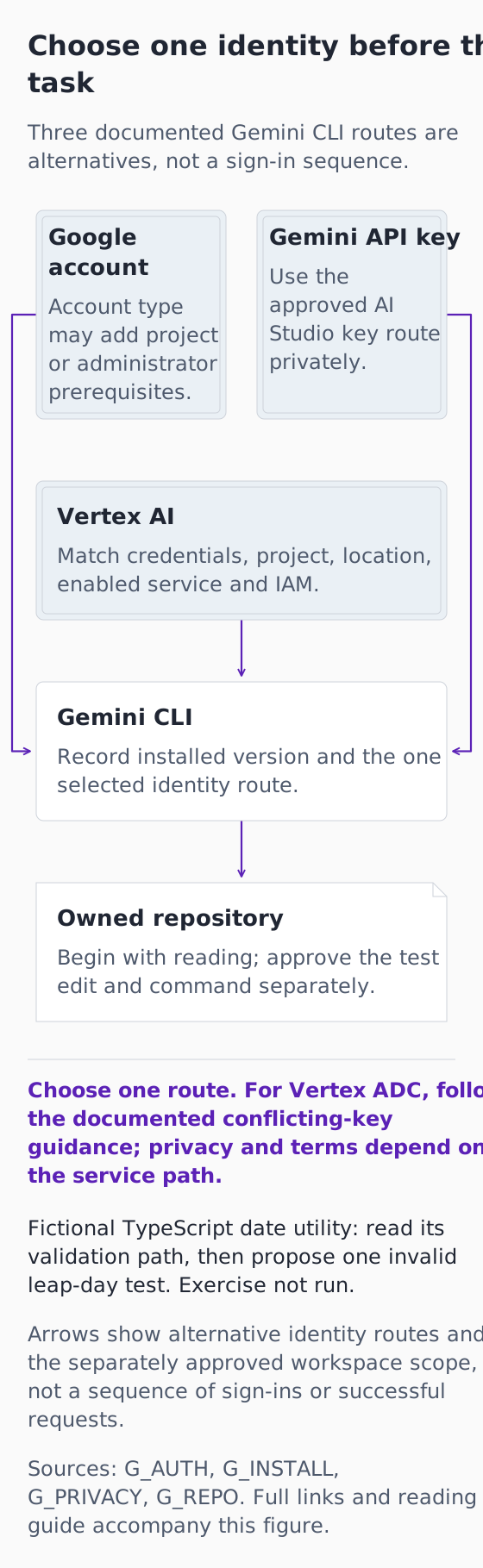
*Original explanatory infographic for “Choose Gemini CLI's identity path before giving it a repository”. Documentation checked 16 October 2026. Fictional exercise; no connected account, completed request or observed result.*
[Open the full-size explanatory diagram](/assets/practical-ai-gemini-identities-20261016.svg)
This original diagram explains documented boundaries and a fictional exercise that has not been run. It is not an authentic product screenshot, a connected account or a successful request.
Choose one identity before the task
Three documented Gemini CLI routes are alternatives, not a sign-in sequence.
Google account
Account type may add project or administrator prerequisites.
Gemini API key
Use the approved AI Studio key route privately.
Vertex AI
Match credentials, project, location, enabled service and IAM.
Gemini CLI
Record installed version and the one selected identity route.
Owned repository
Begin with reading; approve the test edit and command separately.
Choose one route. For Vertex ADC, follow the documented conflicting-key guidance; privacy and terms depend on the service path.
Fictional TypeScript date utility: read its validation path, then propose one invalid leap-day test. Exercise not run.
Arrows show alternative identity routes and the separately approved workspace scope, not a sequence of sign-ins or successful requests.
Sources: G_AUTH, G_INSTALL, G_PRIVACY, G_REPO. Full links and reading guide accompany this figure.
Google account → Gemini CLI: Alternative Google-account route, subject to its own prerequisites.
Gemini API key → Gemini CLI: Alternative Gemini API-key route.
Vertex AI → Gemini CLI: Alternative Vertex route, using the documented project and identity prerequisites.
Gemini CLI → Owned repository: Only the approved workspace and tool scope are proposed for the task.
The three arrows are mutually alternative identity selections, not concurrent credentials, sequential sign-ins or a generic arbitrary-provider proxy. Vertex ADC is one documented Vertex option, not a synonym for every Vertex credential. The CLI version and route-specific privacy terms must be checked for the actual installation.
The proposed pilot uses a small owned copy without deployment secrets or customer data. Keep the parser unchanged when only a test is authorized. Review the plan, diff and existing narrow command before execution, and compare any claimed outcome with an actual observation.
Diagram source references
- [G_AUTH: Gemini CLI authentication setup](https://geminicli.com/docs/get-started/authentication/) — Google / google-gemini.
- [G_INSTALL: Gemini CLI installation, execution, and releases](https://geminicli.com/docs/get-started/installation/) — Google / google-gemini.
- [G_PRIVACY: Gemini CLI license, terms and privacy notices](https://geminicli.com/docs/resources/tos-privacy/) — Google / google-gemini.
- [G_REPO: Gemini CLI canonical repository](https://github.com/google-gemini/gemini-cli) — google-gemini repository.