Kimi Code and Mistral Vibe need separate onboarding records
Set up two independently explainable coding-agent routes before comparing interfaces, permissions or outputs.
A model provider, a coding agent and a desktop front end can share a conversation without sharing configuration. That distinction matters when a developer wants to evaluate Kimi Code alongside Mistral Vibe. Both projects offer agentic development workflows, but their executable names, authentication choices, provider schemas and surrounding applications are not a single interchangeable “AI setup.”
An effective comparison begins with two working, explainable routes and a small common task. It does not begin by copying one tool's settings into the other. The procedure below is an illustrative evaluation plan, not a report of installed clients or measured model performance. Official material was checked on 16 October 2026.
Record the actual deliverable
MoonshotAI's canonical `kimi-code` repository describes the Kimi coding agent and its setup. Its release redirect resolved to the `@moonshot-ai/[email protected]` tag during this check. That release includes a `kimi app [path]` desktop-opening command, but the announcement of a command does not prove that a reader has the matching desktop installation or that every CLI setting applies identically there. [The tagged release](https://github.com/MoonshotAI/kimi-code/releases/tag/@moonshot-ai/[email protected]) is a version anchor, not a local acceptance receipt.
For Mistral Vibe, the official repository's release redirect resolved to v2.26.1. Record that reference separately from the result of `vibe --version` on the target machine. In either project, a current README and a published installer can evolve at different speeds. Match the instructions to the installed deliverable rather than assuming that the newest documentation retrofits an older binary.
Bring up Kimi independently
1. Use the official [Kimi Code repository](https://github.com/MoonshotAI/kimi-code) to choose the supported installer for your operating system. Review its prerequisites and the installer before execution; do not copy a shell command from an unrelated fork. 2. Open a fresh terminal in an owned, nonsensitive repository copy and run `kimi --version`. 3. Start `kimi` and use its documented `/login` flow for the intended Kimi Code or Moonshot platform access path. Confirm which account or service owns that route. 4. If using a custom model provider, follow Kimi's current provider documentation and record the selected provider type, model alias and endpoint. Do not assume that a key for a chat website is an API credential. 5. Begin with a source-reading request and inspect any tool permission request before allowing changes.
Kimi's provider documentation distinguishes its Moonshot-oriented provider, OpenAI Chat Completions, OpenAI Responses, Anthropic and Google interfaces. Those are protocol choices with their own configuration, not a promise that every model exposes every capability. Its [providers and models guide](https://www.kimi.com/code/docs/en/kimi-code-cli/configuration/providers) is the reference; review the version boundary if your installed client presents different fields.
Bring up Vibe independently
Use Mistral's [install and setup guide](https://docs.mistral.ai/vibe/code/cli/install-setup) for the operating-system-specific path. The current page describes manual-install Python prerequisites and an installer that uses `uv`; it also documents first-run account or API-key setup. Do not assume that a generic Python package command provisions all required shell and PATH behavior on every platform.
Verify `vibe --version`, then open `vibe` in the second repository copy. The documented `vibe --setup` command can reopen setup. Choose the account or compatible key route approved for the evaluation, and record it without storing the key in the handover. A valid Mistral account path and a custom-provider key represent different access arrangements.
Mistral documents `~/.vibe/config.toml` and a Vibe home directory containing configuration and state. Its provider schema uses fields such as `api_base`, `api_key_env_var` and `api_style`; a custom provider can also require a corresponding model entry. Do not paste Kimi's provider table into this file. [Vibe configuration](https://docs.mistral.ai/vibe/code/cli/configuration) gives the exact current structure.
Compare a useful development workflow
Consider a fictional repository that reads project manifests and produces a dependency summary. Include a tiny fixture with one intentionally missing optional field. Ask each client to identify the parsing path and explain what happens when the field is absent. Start with read-only reasoning and verify the explanation against the code.
Next, authorize a test case confined to the fixture and test file. Require a proposed plan, inspect the patch and approve only the existing narrow test command. Keep the production parser unchanged unless a separately reviewed correction is needed. Use the same intended behavior and acceptance criteria in both copies, but allow each agent to express its own plan.
Record concrete observations: which files were read, which command was requested, whether approval was requested at the expected point, whether the test actually completed and whether the final explanation matches its output. Do not turn a preference for one interface into a claim of model superiority. Different tools and defaults remain confounding factors, and one small exercise is not a benchmark study.
Add a desktop surface only after the terminal route works
If you want a graphical front end, identify whether it launches an external agent process or supplies its own inference engine. A front end's model selector may configure only the built-in engine. Its detection of `kimi` or `vibe-acp` is not proof that the external process inherited the correct identity, workspace or provider settings.
For Kimi's own desktop entry, follow the matching release and product documentation. For an external ACP-capable application, follow that application's adapter instructions and the coding agent's independent authentication documentation. Do not label any generic desktop chat window “Kimi Code” or “Mistral Vibe” simply because it calls a similarly named model.
Separate licensing, model access and data handling
The inspected Kimi Code license is MIT; Mistral Vibe's repository states Apache 2.0. These software licenses do not supply API usage rights, hosted-model credits or a blanket license to all model weights and plugins. Preserve the applicable notices when redistributing code, and review commercial provider terms separately. [Kimi's license](https://github.com/MoonshotAI/kimi-code/blob/main/LICENSE) and the [Vibe repository](https://github.com/mistralai/mistral-vibe) establish the client-code references.
A local terminal does not imply local inference. Conversely, a local model endpoint does not make network-enabled tools automatically offline. Map the model destination, repository content, shell tools and any external integrations separately. Keep the evaluation workspace free of production credentials and decline unplanned deployment, publication or account changes.
If a response disappears after a command, inspect the actual repository before repeating the action. Save the tool outcome and a safe request reference. The handover should identify two client versions, two configuration sources, their credential owners and the observed task results. Add a separate row for each desktop path actually tested. This preserves the useful differences between the agents instead of hiding them behind a shared model label.
Explanatory diagram and accessible reading guide
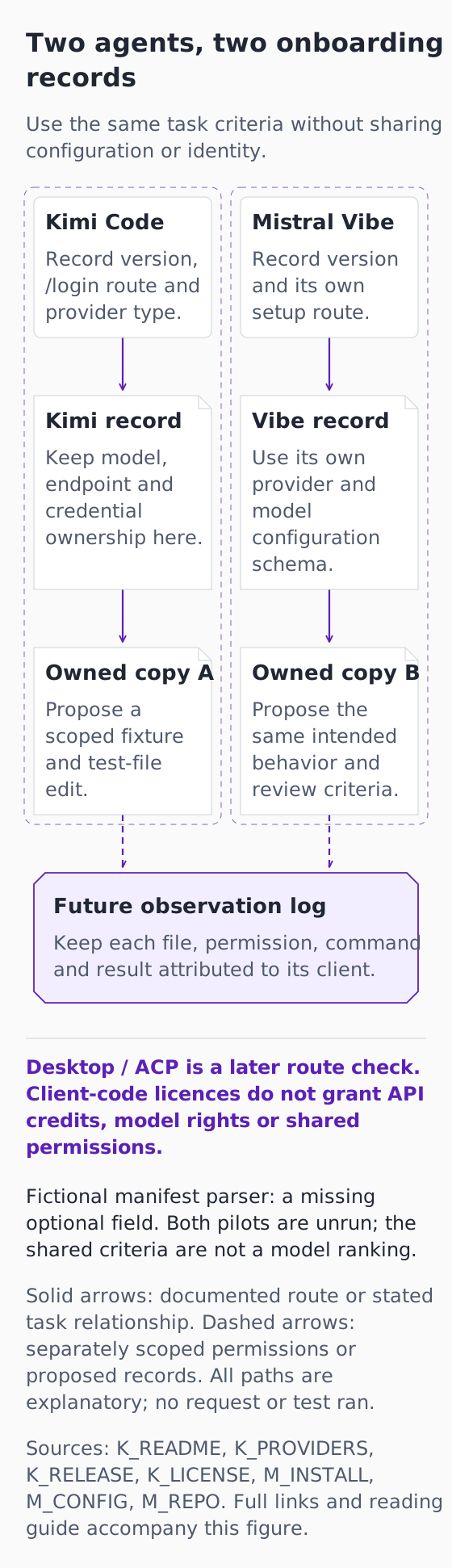
*Original explanatory infographic for “Kimi Code and Mistral Vibe need separate onboarding records”. Documentation checked 16 October 2026. Fictional exercise; no connected account, completed request or observed result.*
[Open the full-size explanatory diagram](/assets/practical-ai-kimi-vibe-records-20261016.svg)
This original diagram explains documented boundaries and a fictional exercise that has not been run. It is not an authentic product screenshot, a connected account or a successful request.
Two agents, two onboarding records
Use the same task criteria without sharing configuration or identity.
Kimi Code
Record version, /login route and provider type.
Mistral Vibe
Record version and its own setup route.
Kimi record
Keep model, endpoint and credential ownership here.
Vibe record
Use its own provider and model configuration schema.
Owned copy A
Propose a scoped fixture and test-file edit.
Owned copy B
Propose the same intended behavior and review criteria.
Future observation log
Keep each file, permission, command and result attributed to its client.
Desktop / ACP is a later route check. Client-code licences do not grant API credits, model rights or shared permissions.
Fictional manifest parser: a missing optional field. Both pilots are unrun; the shared criteria are not a model ranking.
Solid arrows: documented route or stated task relationship. Dashed arrows: separately scoped permissions or proposed records. All paths are explanatory; no request or test ran.
Sources: K_README, K_PROVIDERS, K_RELEASE, K_LICENSE, M_INSTALL, M_CONFIG, M_REPO. Full links and reading guide accompany this figure.
Kimi Code → Kimi record: Record the selected Kimi route using Kimi-specific provider configuration.
Mistral Vibe → Vibe record: Record the selected Vibe route using Vibe-specific provider/model configuration.
Kimi record → Owned copy A: Apply the scoped Kimi pilot to its own repository copy. This denotes evaluation scope, not a completed write.
Vibe record → Owned copy B: Apply the scoped Vibe pilot to its own repository copy. This denotes evaluation scope, not a completed write.
Owned copy A → Future observation log: Keep any future observations from copy A separately attributable.
Owned copy B → Future observation log: Keep any future observations from copy B separately attributable.
The paired lanes remain independent. Convergence at the observation log means comparing attributed records, not pooling credentials, outcomes or configuration. Kimi MIT and Vibe Apache2 cover the inspected client code. A desktop-opening command or detected ACP process needs its own installed-version, authentication and workspace acceptance.
Give each owned copy an invented manifest fixture with the same intentionally absent optional field. Verify read-only explanations, then review a fixture/test-only patch and existing command. Separate actual test observations, if later obtained, from the agent's summary. No success, speed or cost score is plotted.
Diagram source references
- [K_README: Kimi Code README](https://github.com/MoonshotAI/kimi-code/blob/main/README.md) — MoonshotAI repository.
- [K_PROVIDERS: Kimi Code providers and models](https://www.kimi.com/code/docs/en/kimi-code-cli/configuration/providers) — Moonshot AI / Kimi Code.
- [K_RELEASE: Kimi Code release @moonshot-ai/[email protected]](https://github.com/MoonshotAI/kimi-code/releases/tag/@moonshot-ai/[email protected]) — MoonshotAI repository.
- [K_LICENSE: Kimi Code MIT license](https://github.com/MoonshotAI/kimi-code/blob/main/LICENSE) — MoonshotAI repository.
- [M_INSTALL: Mistral Vibe install and setup](https://docs.mistral.ai/vibe/code/cli/install-setup) — Mistral AI.
- [M_CONFIG: Mistral Vibe configuration](https://docs.mistral.ai/vibe/code/cli/configuration) — Mistral AI.
- [M_REPO: Mistral Vibe canonical repository and license](https://github.com/mistralai/mistral-vibe) — mistralai repository.