Make a Claude Code gateway connection reviewable from the first request
Separate routing, credentials and desktop configuration before relying on an agentic coding workflow.
A developer can change a base URL, receive a fluent answer and still have the wrong connection. The request might use a personal subscription credential, a gateway might translate plain text but mishandle tools, or a desktop application might ignore the setting entirely. For a team adopting Claude Code, the useful question is therefore operational: can this exact client complete a small, reviewable coding workflow through the intended service, with the expected identity and permission boundaries?
This guide separates documented configuration from a proposed acceptance exercise. The exercise is illustrative, has not been run for a named organization, and offers no performance or spending result. The documentation was checked on 16 October 2026; an installed client still needs its own version record.
Identify the surface before changing anything
Claude Code's terminal client and the Claude desktop application's inference configuration are different surfaces. Anthropic's current gateway instructions describe `ANTHROPIC_BASE_URL` for the CLI, but direct Desktop to its third-party inference configuration. A desktop MCP extension is also not a replacement model endpoint: providing a tool and choosing the service that performs inference are different integration decisions. [Gateway connection guidance](https://code.claude.com/docs/en/llm-gateway-connect) is the starting point for those distinctions.
Write down the surface, operating system, installed version, repository and current authentication route. Use `claude --version` to identify the binary; do not infer a release from an installer filename. On a managed device, first ask whether organizational policy already supplies the gateway. A successful personal experiment should not overwrite an administrator's routing or permission policy.
Ask for a connection contract
Obtain the approved HTTPS base URL, authentication mechanism, permitted model identifier or alias, certificate requirements and the person responsible for gateway incidents. Ask specifically which client features the service supports. A provider saying “Anthropic-compatible” is a useful starting description, not proof that every Claude Code feature has passed through its implementation.
Anthropic documents gateway selection and organization-wide controls separately. Its managed `allowedProviders` treatment includes version requirements; the page currently identifies Claude Code v2.1.285 or later for provider-specific endpoint-variable enforcement. That is a requirement for the stated control, not a claim that every older client is unusable. [Other LLM gateways](https://code.claude.com/docs/en/llm-gateway) explains this scope.
For an individual pilot, agree in advance that it will use one disposable repository copy, one approved credential and no external publishing. This makes a wrong route a bounded diagnostic problem rather than a production incident.
Configure one route, then inspect its identity
1. Preserve the current configuration through your normal secure backup process. Record which settings are user-managed and which are enforced. 2. Open a fresh terminal in the approved test repository. Verify the intended `claude` executable and its version. 3. Set the gateway address and the credential mechanism supplied by its operator. An illustrative POSIX routing line is `export ANTHROPIC_BASE_URL="https://gateway.example.org"`. The example domain is not a service to contact. 4. Deliver the credential privately. Choose the documented bearer-token, API-key or helper route appropriate to that gateway; do not populate several mechanisms by habit. 5. Start the client and inspect its reported configuration before sending repository content. Confirm that the expected model and provider route are active. 6. Send a small nonsensitive request and ask the gateway operator to corroborate the route using an approved request reference. Redact credentials and source content from any shared diagnostic record.
The reason to separate steps three and four is substantive. Anthropic says an active gateway credential or `apiKeyHelper` replaces the saved subscription credential for those requests. Setting only the base URL does not by itself replace that credential. The same address can therefore participate in different authentication and billing paths. Do not promise “included in my subscription” or “charged to the company” until the active credential owner is confirmed. [The subscription section](https://code.claude.com/docs/en/llm-gateway#subscriptions-and-gateways) documents the distinction; current commercial terms belong in the operator's agreement, not a copied price table.
An illustrative acceptance exercise
Suppose a team maintains a small CSV importer. Create a fictional repository containing an importer, two tests and a deliberately malformed input file. Do not copy customer exports. Ask the agent to explain which test covers a missing column, without editing files. Check the explanation against the source yourself.
Next, authorize a change limited to that test file. Ask for a new case proving that an empty header is rejected. Review the proposed file change and any command request before approval. Finally, run the narrow test command through the approved tool boundary and inspect the actual result. A sentence claiming the test passed is insufficient; the record should show which command ran and whether it completed.
This exercise crosses useful boundaries: source retrieval, a tool request, a tool result, an edit and a follow-up explanation. A gateway that merely forwards the first chat response has not demonstrated the complete path. Conversely, a failed test is not automatically a gateway defect: the proposed assertion or repository may be wrong. Keep transport, tool permission, code correctness and test outcome as separate observations.
Desktop requires its own setup
The current official connection guide describes a local Desktop form reached through Help, Troubleshooting, Enable Developer Mode, followed by Developer, Configure Third-Party Inference. Administrator-distributed configuration takes precedence. It also documents unavailable cloud-environment and Remote Control options when gateway configuration is active, plus separate requirements for SSH sessions. These are product-specific limits, not reasons to improvise a terminal-variable workaround.
Use the [Desktop gateway deployment documentation](https://claude.com/docs/third-party/claude-desktop/gateway) for the actual desktop contract. Re-run the small acceptance exercise from that surface. A terminal success does not establish that an app launched from a shortcut inherited the same route, credentials or workspace. Record the Desktop version independently from the CLI version.
That Desktop-on-3P documentation specifically describes Claude models behind a gateway implementing the Anthropic Messages API. Its model-discovery and explicit-model settings have their own constraints. It is not a blanket promise that Desktop is an arbitrary OpenAI-compatible model client. If a provider's instructions suggest working around model-name restrictions, distinguish that provider claim from Anthropic's supported contract; do not bypass an organizational allowlist or represent the workaround as official desktop acceptance.
Treat diagnostics as sensitive evidence
An agent can expose information through prompts, file tools, shell commands, network tools and the gateway's own logs. Removing secrets from a prompt does not make a repository safe if a subsequent tool reads an unrestricted credential directory. Keep the initial workspace small, require permission for consequential operations and review the client's [security guidance](https://code.claude.com/docs/en/security).
When a request fails after a tool action, inspect the repository before repeating it. The change may have completed even if its final response was lost. Preserve the diff, relevant request reference and safe error category; do not paste raw authorization headers into a ticket. Restore the known configuration if the route cannot be explained, rather than accumulating alternative credentials until something responds.
The handover should state the client version, selected route, credential owner, files authorized, exercise outcome and unresolved features. That is a useful adoption decision. A screenshot of a model name is not. For readers learning the terminal workflow itself, the official [Claude Code 101 course](https://academy.claude.com/courses/claude-code-101) is a complementary starting point; it does not certify a particular gateway.
Explanatory diagram and accessible reading guide
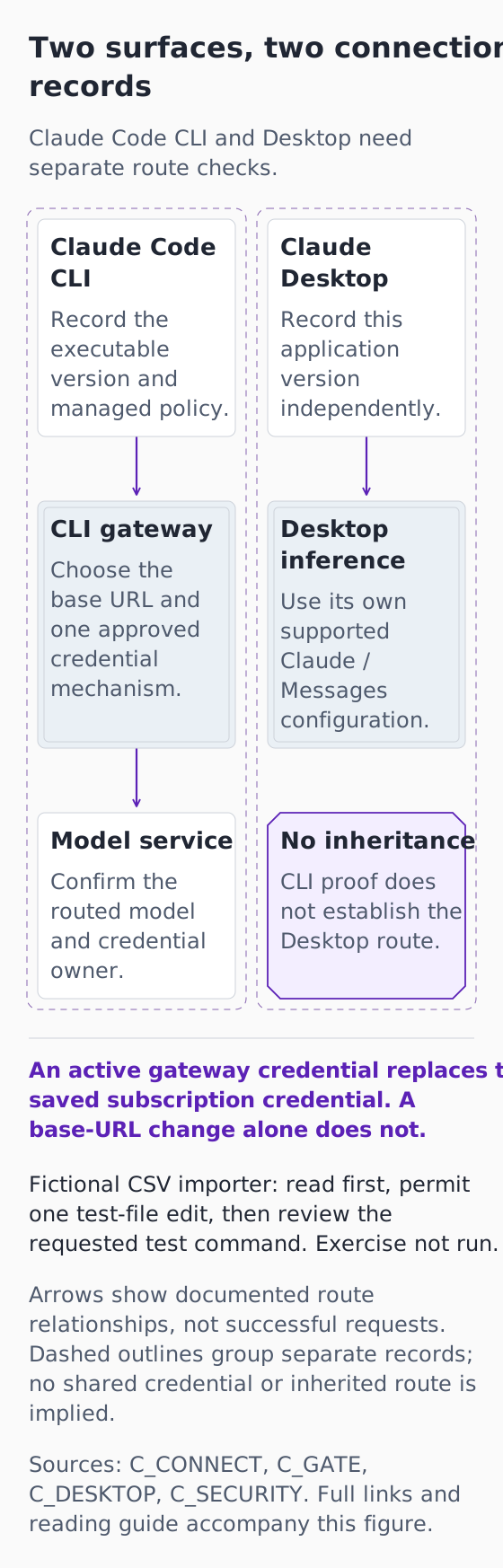
*Original explanatory infographic for “Make a Claude Code gateway connection reviewable from the first request”. Documentation checked 16 October 2026. Fictional exercise; no connected account, completed request or observed result.*
[Open the full-size explanatory diagram](/assets/practical-ai-claude-surfaces-20261016.svg)
This original diagram explains documented boundaries and a fictional exercise that has not been run. It is not an authentic product screenshot, a connected account or a successful request.
Two surfaces, two connection records
Claude Code CLI and Desktop need separate route checks.
Claude Code CLI
Record the executable version and managed policy.
Claude Desktop
Record this application version independently.
CLI gateway
Choose the base URL and one approved credential mechanism.
Desktop inference
Use its own supported Claude / Messages configuration.
Model service
Confirm the routed model and credential owner.
No inheritance
CLI proof does not establish the Desktop route.
An active gateway credential replaces the saved subscription credential. A base-URL change alone does not.
Fictional CSV importer: read first, permit one test-file edit, then review the requested test command. Exercise not run.
Arrows show documented route relationships, not successful requests. Dashed outlines group separate records; no shared credential or inherited route is implied.
Sources: C_CONNECT, C_GATE, C_DESKTOP, C_SECURITY. Full links and reading guide accompany this figure.
Claude Code CLI → CLI gateway: The CLI uses its documented gateway route.
CLI gateway → Model service: The gateway routes requests to the authorized model service.
Claude Desktop → Desktop inference: Desktop uses its own third-party inference configuration.
This is a documented route comparison, not a claim that either surface is connected. Desktop support is scoped to its documented Claude / Anthropic Messages contract; no arbitrary-provider bridge or allowlist workaround is implied. Local tools and organizational policy remain independent controls.
The manuscript proposes a missing-column reading task followed by an empty-header test. Use one owned disposable repository copy and no customer export. A text answer, a permitted edit and an actual test result must be recorded separately. Repeat independently for Desktop if that surface is evaluated.
Diagram source references
- [C_CONNECT: Connect Claude Code to an LLM gateway](https://code.claude.com/docs/en/llm-gateway-connect) — Anthropic.
- [C_GATE: Other LLM gateways](https://code.claude.com/docs/en/llm-gateway) — Anthropic.
- [C_DESKTOP: Deploy Claude Desktop on 3P with an LLM gateway](https://claude.com/docs/third-party/claude-desktop/gateway) — Anthropic.
- [C_SECURITY: Claude Code security](https://code.claude.com/docs/en/security) — Anthropic.