Muse Spark Open comes to Mac Studio clusters: what local AI actually requires
Meta and Apple document a real local-inference route, with workstation memory, interconnect, licence and software requirements that a MacBook headline can conceal.
Meta released **Muse Spark Open on 15 October 2026**, and Apple published a matching account of running it locally with MLX. This is a real development in desktop AI, but its hardware boundary matters: Meta's documented Mac route uses a cluster of Mac Studios. It is not a newly demonstrated way to put the complete model on an ordinary MacBook. The [release announcement](https://research.meta.ai/blog/muse-spark-open) identifies the model and the desktop configuration; this analysis was checked on 16 October.
The name is also specific. Muse Spark Open is an open-weight model, not simply the Muse assistant app or a promise that every earlier Spark version has become downloadable. Its [official model card](https://huggingface.co/meta-models/Muse-Spark-Open-816B-A42B) describes 816 billion total parameters, with 42 billion active, and text, image, video and audio inputs with text output. A computer running a client connected to this model elsewhere is not the computer performing local inference.
What “open” gives a developer
The weights use the [Muse Model License](https://huggingface.co/meta-models/Muse-Spark-Open-816B-A42B/blob/main/LICENSE.md), including attribution, usage conditions and limited commercial terms. If a licensee or its affiliates offer Model as a Service and their aggregate gross revenue exceeds US$20 million in any consecutive twelve-month period, its stated condition requires notification and a separate agreement with Meta. The text includes exceptions for internal use, research and qualifying non-Model-as-a-Service activities. Review those exact terms for the intended deployment rather than treating a social-media licence summary as permission.
That is different from the [MIT licence for MLX LM](https://github.com/ml-explore/mlx-lm/blob/main/LICENSE), the software used to run language models. The [Open Source Initiative's AI definition](https://opensource.org/ai/open-source-ai-definition) also requires more than downloadable parameters, including appropriate code, data information and freedoms. “Open weights under Meta's custom licence” accurately describes this release without claiming unrestricted open-source status for the whole model system. An open-source runtime does not replace the model's terms.
For a developer, local weights create an opportunity to choose the inference environment, inspect integrations and keep an application independent of a particular hosted endpoint. Those are capabilities to evaluate, not automatic privacy or cost guarantees. Downloads, coding tools, dependencies, telemetry and external tools can still communicate outside the workstation. A useful local architecture records those routes instead of assuming that a local model makes the entire workflow offline.
The memory requirement is a cluster requirement
Meta's [Mac cookbook](https://dev.meta.ai/docs/cookbook/muse-spark-open-mac) specifies either two M5 Ultra Mac Studios with 512GB of unified memory each, or four with 256GB each. It requires macOS 26.2 or later, Thunderbolt 5 connectivity and space for the complete NVFP4 checkpoint on every Mac. Apple lists those memory configurations on its [Mac Studio specifications page](https://www.apple.com/mac-studio/specs/). Aggregate capacity does not mean buying any two computers whose advertised memory adds up to a similar number.
There is a date qualification before a purchasing decision. Apple's [25 August Mac Studio announcement](https://www.apple.com/newsroom/2026/08/apple-introduces-new-mac-studio-with-m5-max-and-m5-ultra/) said the 512GB configuration was coming in late October. A launch demonstration and a configurable specification do not establish immediate retail delivery on 16 October. The four-machine alternative is documented, but current stock, regional availability and delivery dates were not tested for this article. No hardware purchase is recommended on that basis.
Apple's [15 October engineering account](https://machinelearning.apple.com/research/mlx-distributed-inference) puts the NVFP4 model footprint at about 493GB before additional inference memory, explaining why it does not fit on one machine in that setup. Meta's model card separately gives generic GPU deployment requirements of at least 700GB VRAM for NVFP4 and 2TB for BF16. These numbers describe different scopes, not interchangeable disk, free-memory or peak-context budgets. The full checkpoint must still be stored locally at each node; do not divide disk planning by the number of Macs.
The active-parameter number describes computation per token, not permission to discard every other expert's weights. Requests can select different experts. Quantisation reduces representation size; it does not turn a clustered model into a demonstrated laptop application. Meta's [deployment overview](https://dev.meta.ai/resources/blog/build-with-muse-spark-open) distinguishes native checkpoints from partner-produced quantisations. A different format needs its own compatibility, memory and quality assessment.
A documented setup, with prerequisites first
The following commands are a source-based walkthrough for an authorised, correctly provisioned Mac cluster. They were not run for this article. They do not install anything on the reader's behalf. Complete the model-access and licence process through the official repository, and obtain the operator's agreement before changing networking, SSH access or recovery settings. Do not enter personal information or a token into a copied third-party form.
First, use the same compatible Python installation and environment path on every Mac. The current [MLX LM project metadata](https://github.com/ml-explore/mlx-lm/blob/main/pyproject.toml) requires Python 3.11 or later and MLX 0.32.2 or later on macOS; the launch cookbook's older MLX minimum is not an exact dependency lock. The [release history](https://github.com/ml-explore/mlx-lm/releases) records Muse support and subsequent name/template fixes. Preserve the actual installed versions rather than recording only “latest”.
Create an isolated environment on each node, using Python's [documented virtual-environment procedure](https://docs.python.org/3/library/venv.html), then the package installation documented by the [MLX LM maintainers](https://github.com/ml-explore/mlx-lm):
```bash python3 -m venv .venv source .venv/bin/activate python -m pip install -U mlx-lm python -m pip show mlx mlx-lm ```
Here `.venv` is an illustrative new directory, not an instruction to reuse an existing application's environment. Choose a Python/package combination supported by its available distributions, and retain the resolved dependency record. The [distributed launcher guide](https://ml-explore.github.io/mlx/build/html/usage/launching_distributed.html) requires the Python binary and program to exist at the same paths across hosts; `mlx.launch --print-python` identifies the path it expects. Activating an environment only on the primary does not configure the other machines.
Second, configure the actual interconnect. The [MLX distributed guide](https://ml-explore.github.io/mlx/build/html/usage/distributed.html) requires a fully connected Thunderbolt mesh for JACCL. Its RDMA enablement procedure runs `rdma_ctl enable` in macOS Recovery, followed by a reboot; `ibv_devices` checks whether devices are exposed. Follow that guide on the intended Macs. These are administrator operations with a physical setup requirement, not an ordinary terminal-only MacBook installation.
Third, prepare the hostfile from real hostnames, reachable addresses and cable-to-RDMA-device mappings. The guide's `mlx.distributed_config` utility can discover connectivity and prepare configuration information. Review its proposed network changes; its optional `--auto-setup` can apply changes when sufficient privileges exist. Do not substitute documentation example IPs or interface names. Meta's cookbook calls the resulting file `hostfile.json`; the launcher uses it to start a process on each authorised host through SSH.
Once those prerequisites and official model access are satisfied, the cookbook supplies a command-line generation route. This version deliberately leaves its experimental fast-synchronisation setting unset:
```bash mlx.launch --hostfile hostfile.json --backend jaccl -- \ mlx_lm.generate \ --model meta-models/Muse-Spark-Open-816B-A42B-NVFP4 \ --prompt "Give me a one-sentence summary of what you can do." \ --max-tokens 4096 --temp 1.0 --top-p 1.0 ```
The omission is intentional. Meta's launch recipe enables `MLX_METAL_FAST_SYNCH=1`, but the current official MLX 0.32.4 guide says that option can deadlock and leave the GPU wedged, and recommends leaving it unset. This walkthrough follows that documented default; it does not reproduce Apple's benchmark settings or promise their speed. If a test stalls, preserve the exact versions and state before changing configuration or repeating it on a shared system.
The generation command can require downloading a very large gated checkpoint. Use the [official NVFP4 repository](https://huggingface.co/meta-models/Muse-Spark-Open-816B-A42B-NVFP4), preserve its revision and check available disk capacity against the full manifest plus working space. No exact all-files disk total or successful download was measured here. The output budget also includes reasoning: Meta's cookbook says the template defaults to `xhigh`. A short visible answer can therefore involve substantially more generated text internally. This text-only walkthrough does not establish audio/video, tool-calling or coding-client parity.
For applications, the cookbook also documents `mlx_lm.server`, while Apple's account illustrates connecting a coding client to its local API. That is a later integration step: confirm the actual listener, access controls and which machine handles the request before connecting a client. Model availability alone does not grant an agent permission to edit files, execute commands, access accounts or transmit repository content.
Measure the task a person actually needs
Apple reports 36.73 tokens per second for four-machine tensor parallelisation at an 8,192-token context, measured over 128 generated tokens in its stated setup. That is a dated vendor benchmark, not this publication's measurement, a MacBook result or a guarantee at the model's maximum advertised context. Compare the exact input size, precision, parallelisation and software before using that number in a capacity decision.
Meta also supplies an [eight-page evaluation-methodology document](https://research.meta.ai/static/muse-spark-open-evaluation-methodology) for this exact release. It distinguishes official leaderboard results, internal evaluations and provider self-reports, and warns that its setups may not reflect every third-party model's best performance. This makes the harness part of the evidence: an agent's tools, prompts and grading can affect the comparison. A headline ranking is not a substitute for checking the methodology relevant to the intended job.
A fictional development team could instead begin with a tiny invented repository containing a deliberately broken date formatter. This is an unrun learning exercise, not a Meta or Apple customer deployment. The team would ask for an explanation and a proposed patch, keeping execution and commits under human control. Its acceptance record would separate model loading, first response, patch correctness, tests and the reviewer’s work.
The same exercise would include missing files and an instruction embedded in an untrusted document asking the agent to send code away. A useful assistant should keep that document as input, not authority. Local inference can help control the model path, but tool permissions and outbound access remain separate controls. An incorrect patch, interrupted generation or unavailable node should remain visible as an unresolved result, without invented success or automatic repeated side effects.
The practical news is that a major open-weight model now has an official Mac-cluster path, supported by both Meta's recipes and Apple's engineering account. A MacBook can be a client in an appropriately secured setup, but that should be described as a client connection, not evidence that the laptop holds and runs this checkpoint. Choose the route from the actual hardware, licence, interconnect and task; the phrase “runs on Mac” is only the beginning of that decision.
Conceptual diagram and reading guide
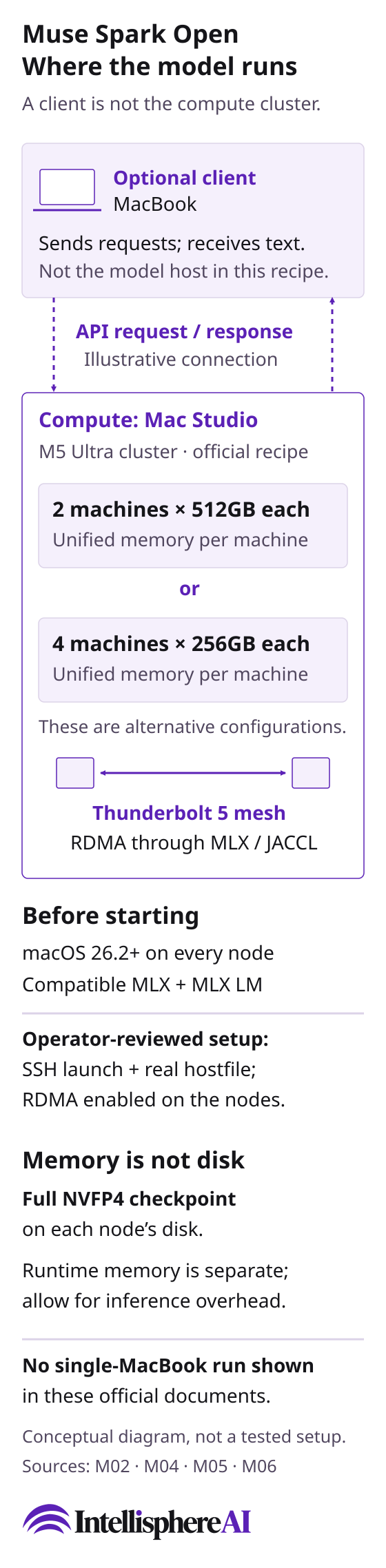
Original conceptual configuration diagram, based on the linked Meta and MLX documentation. A laptop is an illustrative client, not demonstrated model-host hardware. No model run, benchmark, working connection, stock or security approval is shown.
[Open the complete configuration diagram](/assets/muse-spark-open-mac-cluster-20261016.svg)
Text reading guide
The laptop is an optional client. Dashed arrows represent an illustrative API request and response, not a tested endpoint or an approved connection. The separate Mac Studio cluster performs inference.
The documented alternatives are two M5 Ultra Mac Studios with 512GB of unified memory each, or four with 256GB each. They are alternative configurations; the numbers describe each machine, not checkpoint disk size. They establish neither stock nor delivery.
The two small node symbols show a link, not the complete four-machine wiring map. The MLX JACCL setup requires direct Thunderbolt connections between every pair of compute nodes. RDMA exchanges inference data; SSH launches the program, while the real hostfile maps the machines and devices. These roles are separate.
Every compute node needs macOS 26.2 or later and compatible MLX and MLX LM software. The operator must review the real SSH, hostfile and RDMA configuration. This diagram neither changes a machine nor supplies working credentials or addresses.
Each node needs disk space for the full NVFP4 checkpoint even though inference distributes the model. Runtime memory also needs inference overhead. This is not a peak-memory or maximum-context budget, and the different model-footprint and generic GPU-memory figures in the sources are not interchangeable.
No single-MacBook run is demonstrated in the inspected documents. This is an original conceptual diagram, not a screenshot, product photograph, benchmark, successful client integration, security assessment or licence clearance. The article's unrun exercise remains fictional; this figure supplies no model output.
Diagram references
- [M02: Muse Spark Open 816B A42B — official model card](https://huggingface.co/meta-models/Muse-Spark-Open-816B-A42B) - [M04: Local and Distributed Large LLM Inference with MLX and RDMA on Mac Studio](https://machinelearning.apple.com/research/mlx-distributed-inference) - [M05: Muse Spark Open on Mac](https://dev.meta.ai/docs/cookbook/muse-spark-open-mac) - [M06: Distributed Communication — MLX0.32.4 documentation](https://ml-explore.github.io/mlx/build/html/usage/distributed.html)